Webhooks to iPhone notifications
Quickstart
Hark turns an HTTP request into a source-branded iPhone notification. Create a service, then POST JSON to its secret webhook URL.
What Hark is
Anything that can send an HTTP request can notify your phone: CI jobs, coding agents, cron scripts, monitors. Each service carries its own name, avatar, and tap destination, and Hark fills in any field you omit from those service defaults.
There are two APIs, both authenticated by the same webhook token. The Notification API sends one-shot pushes and optional approval prompts. The Activity API drives a stateful Live Activity on the Lock Screen and in the Dynamic Island.
Create a service
- Sign in at hark.fyi.
- Register your iPhone with Hark for iPhone.
- Create a service in the dashboard and give it a title, avatar, and tap URL.
- Copy the secret webhook URL it returns.
Copy the webhook URL
The plaintext token is shown when the service is created and whenever you rotate it. Treat it as a credential: anyone holding it can notify your devices.
https://hark.fyi/hooks/whk_your_tokenAn unknown or rotated token returns 404 with { "ok": false, "error": "Unknown webhook" }.
Send a notification
Only body is required. Everything else falls back to the service defaults.
curl -X POST https://hark.fyi/hooks/whk_your_token \
  -H 'Content-Type: application/json' \
  -H 'Idempotency-Key: deploy-184-production' \
  -d '{
    "body": "Production deployed successfully.",
    "title": "GitHub",
    "imageUrl": "https://github.com/github.png",
    "url": "https://github.com/acme/app/actions"
  }'
Read the response
{
  "ok": true,
  "eventId": "evt_Cxns2IdbF4H0TJYq",
  "delivered": 1
}
eventId identifies the event in the dashboard activity log and, for interactive notifications, is the handle used to read or cancel the pending response. delivered is the number of push requests accepted by Expo.
A request with no registered device still succeeds with delivered: 0 and a message field, so an unpaired phone never fails your build.
Notification API
One-shot pushes, delivered to every registered iPhone or to the devices you name. The webhook token in the URL is the only credential.
Endpoint
| Route | Purpose |
|---|---|
| POST /hooks/:token | Send a notification. |
| GET /hooks/:token/events/:eventId | Read the state of an interactive response. |
| POST /hooks/:token/events/:eventId/cancel | Withdraw a pending interactive response. |
| POST /hooks/:token/events/:eventId/withdraw | Request removal of a delivered notification. |
Send Content-Type: application/json. An unrecognised token returns 404; a payload that fails validation returns 400 with an issues array describing each field.
Request payload
| Field | Type | Description |
|---|---|---|
| body | string, required | Notification message, 1 to 8,000 characters (at most 16 KiB of UTF-8) after trimming. Interactive requests with response keep the 2,000-character limit. |
| title | string | Sender-name override, up to 80 characters. Defaults to the service title. |
| imageUrl | string | Public HTTPS avatar URL, up to 2,048 characters. localhost, .local, loopback, link-local and private IP ranges are rejected. |
| url | string | Web URL, universal link, app deep link, or Shortcuts URL opened when the notification is tapped. Up to 2,048 characters. |
| deviceIds | string[], Pro | 1 to 50 device IDs from the dashboard. Omit to notify every active device. |
| response | object | Turns the notification into an approval, yes/no, or text prompt. |
| project | string | Project display name, up to 80 characters. Files the notification into that project in the Hark app inbox, creating it on first use. |
| summary | string | Short digest, up to 500 characters. Replaces the body in the push banner and list previews; the full body stays readable in the app. |
| bodyFormat | enum | text or markdown. Stored metadata describing the body; omitted means text. |
| appId | string | A web app ID (app_…) on your account. Tapping opens that app in Hark, at url when given; url must then share the app's origin. Not combinable with response. |
Projects and summaries
Send an optional project display name to group notifications in the Hark app inbox. Project identity is case-insensitive and Unicode-normalized within your account, so Acme App and acme app are the same project; the first spelling you send becomes the display name. Notifications without a project land in a shared Other bucket.
Long bodies stay intact in storage and in the app's notification detail, while the push banner and list rows show the summary when you provide one, or a bounded preview otherwise. Bodies render as plain text with tappable links; bodyFormat is recorded for future rendering and does not change V1 display.
Accounts hold up to 500 projects. Once the cap is reached, a request naming a new project still delivers — the notification is stored without a project and the response carries an explanatory message. Existing project names keep resolving normally.
Withdraw a notification
Keep the eventId returned when you send a notification, then use it to request removal of that notification from the account's registered iPhones.
curl -X POST \
  'https://hark.fyi/hooks/whk_your_token/events/evt_Cxns2IdbF4H0TJYq/withdraw'
{
"ok": true,
"eventId": "evt_Cxns2IdbF4H0TJYq",
"status": "withdrawn",
"accepted": 1
}accepted means Expo accepted the silent removal command; it does not guarantee that iOS ran it. Background delivery is best effort and may be delayed or skipped, particularly after the user force-quits Hark. The same webhook token must own the event. Repeating a completed withdrawal is idempotent and does not send another command.
Deep links and Shortcuts
Set url per notification or as the service default. Hark opens it only after the recipient explicitly taps the notification; receiving a push does not launch an app or run background automation.
- Use an
https://universal link when the destination app supports one. iOS opens the installed app and otherwise falls back to its website. - Use the destination app's documented custom scheme for app-only routes, such as
your-app://incidents/INC-42. If no installed app handles the scheme, Hark remains open. - Percent-encode names, paths, and query values that contain spaces or reserved characters.
{
  "body": "Incident INC-42 needs attention.",
  "url": "your-app://incidents/INC-42"
}
To run a shortcut saved on the recipient's iPhone, use Apple's Shortcuts URL scheme. The shortcut name must match exactly. Set input=text and provide URL-encoded text, or set input=clipboard to pass the current clipboard.
{
  "body": "Production deployed. Tap to run the follow-up.",
  "url": "shortcuts://run-shortcut?name=Deployment%20Follow-up&input=text&text=production%20deployed"
}
iOS may require the device to be unlocked, and the shortcut can still show its own permission or confirmation prompts. Hark cannot run a shortcut merely because a notification arrived. Unsafe local or executable schemes such as javascript:, data:, file:, blob:, and about: are rejected.
Idempotency
Send an optional Idempotency-Key header of 1 to 200 characters. Keys are scoped to a single service.
- Same key and payload: the original event is returned with
idempotent: true. - Same key while the first request is still in flight:
202 Accepted. - Same key with a different payload:
409 Conflict. - Blank or over-length key:
400.
Device routing
By default a request fans out to every active iOS device on the account, most recently seen first. Free accounts are capped at one device, so extra phones are ignored until you upgrade.
Hark Pro can pass a non-empty deviceIds array to target specific iPhones. Copy the stable device IDs from the dashboard. IDs that do not belong to the account return 400 Invalid device selection; owned but inactive or non-iOS devices in the list are skipped silently.
{
  "body": "The production deploy needs attention.",
  "deviceIds": ["dev_your_iphone_id"]
}
Sending deviceIds without device routing on your plan returns 402.
Rate limits
| Limit | Free | Pro |
|---|---|---|
| Requests per minute, per service | 60 | 300 |
| Requests per minute, per account | 300 | 1,500 |
| Notifications per month | 10,000 | 100,000 |
| Active devices | 1 | Unlimited |
The per-minute counters use a rolling 60-second window and are shared across notifications, interactive responses, and Live Activity operations. A limited request returns 429 with a Retry-After: 60 header and retryAfterSeconds in the body. Exhausting the monthly allowance also returns 429, without a retry hint.
Response shape
{
  "ok": true,
  "eventId": "evt_Cxns2IdbF4H0TJYq",
  "delivered": 1
}| Field | Type | Description |
|---|---|---|
| 200 | ok | Accepted, or an idempotent replay. |
| 202 | ok | An identical request is still processing. |
| 400 | error | Invalid payload, key, or device selection. |
| 402 | error | deviceIds routing requires Hark Pro. |
| 404 | error | Unknown webhook token. |
| 409 | error | Idempotency key reused with a new payload. |
| 429 | error | Rate limit or monthly allowance exhausted. |
| 502 | error | Every push target was rejected by Expo. |
Provider errors can embed a device push token, so they are recorded in the dashboard activity log rather than returned to the caller. Use that log to find devices that are no longer registered.
Interactive responses
Any notification can carry a fixed response type, on every plan. Supported types are approval (Approve or Deny), yes_no (Yes or No), and text (a short free-form reply).
{
  "title": "Production deploy",
  "body": "Deploy commit 8e7fc2a?",
  "response": {
    "type": "approval",
    "expiresInSeconds": 900,
    "correlationId": "deploy-184",
    "callback": {
      "url": "https://ci.example.com/hark-response",
      "token": "private-callback-token"
    }
  }
}| Field | Type | Description |
|---|---|---|
| type | string, required | approval, yes_no, or text. |
| expiresInSeconds | integer | 30 to 86,400. Defaults to 900. |
| correlationId | string | Your own identifier, up to 100 characters. Echoed back on the callback. |
| callback.url | string | Public HTTPS URL that receives the answer. |
| callback.token | string | 16 to 512 characters, sent back as a bearer token so you can verify Hark. |
The response body gains a response object alongside the usual fields:
{
  "ok": true,
  "eventId": "evt_Cxns2IdbF4H0TJYq",
  "delivered": 1,
  "response": { "status": "pending", "expiresAt": "2026-07-25T18:19:04.000Z" }
}
Read and cancel
Poll the event with the eventId from the send response, or withdraw it while it is still pending.
curl https://hark.fyi/hooks/whk_your_token/events/evt_Cxns2IdbF4H0TJYq

curl -X POST https://hark.fyi/hooks/whk_your_token/events/evt_Cxns2IdbF4H0TJYq/cancel
{
"ok": true,
"event": {
"id": "evt_Cxns2IdbF4H0TJYq",
"response": {
"status": "approved",
"action": "approve",
"text": null,
"correlationId": "deploy-184",
"respondedAt": "2026-07-25T18:06:52.000Z",
"expiresAt": "2026-07-25T18:19:04.000Z"
}
}
}statusis one ofpending,approved,denied,yes,no,replied,expired, orcanceled.- For
textprompts,actionbecomesreplyandtextholds the answer. For the other typesactionholds the chosen option andtextisnull. - Reading a pending request after
expiresAtsettles it asexpired. - Cancel returns
404if the response is not pending, and events belonging to another service are never visible.
Callbacks
When a callback is configured, Hark POSTs the answer to your URL with Authorization: Bearer <callback.token>, Content-Type: application/json, and a Hark-Callbacks/1 user agent. Redirects are not followed and the request times out after 10 seconds.
{
  "type": "notification.response",
  "eventId": "evt_Cxns2IdbF4H0TJYq",
  "correlationId": "deploy-184",
  "kind": "approval",
  "status": "approved",
  "action": "approve",
  "text": null,
  "respondedAt": "2026-07-25T18:06:52.000Z"
}
kind is approval, yes_no, or reply — a text request arrives as reply.
Any response outside the 2xx range is a failure. Hark makes up to five attempts: once immediately, then after 30 seconds, 2 minutes, 10 minutes, and 1 hour. After the last attempt the callback is marked failed and is not retried, so treat the callback as at-least-once and key your handler on eventId.
Callbacks fire only when someone actually answers. Prompts that expire or are canceled never call back — poll the event route if you need to observe those outcomes.
Activity API
A Live Activity is a stateful card on the Lock Screen and in the Dynamic Island. Start one, push partial updates as work progresses, then end it. Same webhook token, nested routes.
Start an activity
| Route | Purpose |
|---|---|
| POST /hooks/:token/live-activities | Start an activity. Returns 201. |
| GET /hooks/:token/live-activities/:id | Read the current state. |
| PATCH /hooks/:token/live-activities/:id | Apply a partial update. |
| POST /hooks/:token/live-activities/:id/end | Settle and dismiss the activity. |
Only title and status are required.
curl -X POST https://hark.fyi/hooks/whk_your_token/live-activities \
  -H 'Content-Type: application/json' \
  -H 'Idempotency-Key: deploy-184-start' \
  -d '{
    "title": "Deploy #184",
    "status": "Building",
    "progress": 0,
    "symbol": "build",
    "accentColor": "#FF9F0A"
  }'
{
"ok": true,
"activityId": "act_9Rk2wQpLm4Tz",
"sequence": 0,
"status": "active",
"accepted": 1,
"failed": 0,
"state": { "title": "Deploy #184", "status": "Building", "progress": 0, "symbol": "build" },
"expiresAt": "2026-07-26T02:04:11.000Z",
"staleAt": "2026-07-25T22:04:11.000Z",
"endedAt": null
}Use activityId in the update and end routes. If you pass your own key when starting, that value works in the URL too, so a script can address its activity without storing the generated ID. Idempotency-Key works on all three write routes and is scoped to the service: a replay returns idempotent: true, and reusing a key with a different payload returns 409.
Live Activities need a device running a Hark build that has registered a push-to-start token. If no device qualifies, the start still returns 201 with accepted: 0 and an explanatory message.
Update an activity
PATCH merges into the current state, so send only what changed. At least one field other than ifSequence is required. Each accepted update increments sequence.
curl -X PATCH https://hark.fyi/hooks/whk_your_token/live-activities/act_9Rk2wQpLm4Tz \
  -H 'Content-Type: application/json' \
-d '{ "status": "Testing", "progress": 0.6, "accentColor": "#64D2FF" }'- Pass
nullfordetailorprogressto clear the field. - Pass
ifSequenceto make the write conditional. A mismatch returns409 Sequence conflictalong with the current state so you can reconcile. - Updating an activity that has already ended or expired returns
409 Live Activity is already terminal.
End an activity
curl -X POST https://hark.fyi/hooks/whk_your_token/live-activities/act_9Rk2wQpLm4Tz/end \
  -H 'Content-Type: application/json' \
  -d '{ "status": "Deployed", "progress": 1, "symbol": "success" }'
The body is optional. dismissAfterSeconds (0 to 14,400, default 0) controls how long the finished card lingers on the Lock Screen before iOS removes it.
status and symbol have defaults on this route, so omitting them overwrites the live values with "Complete" and success. Send them explicitly if you want the final card to read differently.
Fields and appearance
| Field | Type | Description |
|---|---|---|
| title | string, required | Up to 80 characters. Required on start, optional on updates. |
| status | string, required | Short state line, up to 60. |
| detail | string | Secondary line, up to 240. Nullable. |
| progress | number | 0 to 1 inclusive. Nullable. |
| symbol | enum | terminal, code, build, success, or warning. Defaults to terminal. |
| accentColor | string | Six-digit hex, #RRGGBB. Defaults to #5ED8B7. |
| style | enum | standard, ring, hero, terminal, or steps. Defaults to standard and selects the widget layout. Updates can switch it mid-flight. App builds that predate a style fall back to the standard layout. |
| privacyMode | enum | standard or private. Private replaces the start alert text with a generic line so the title and status stay off a locked screen. |
| key | string, start only | Your own alias, up to 100 characters, usable in place of the activity ID. A key becomes reusable once its activity ends. |
| replace | boolean, start only | End any Live Activity occupying a target device, and any of your own still holding the same key, before starting. Defaults to false. The response reports the displaced count as replaced. |
| deviceIds | string[], Pro | 1 to 50 device IDs. Omit to target every capable device. |
The five progress layouts and four interactive approval layouts, captured from the iOS simulator with the same state:
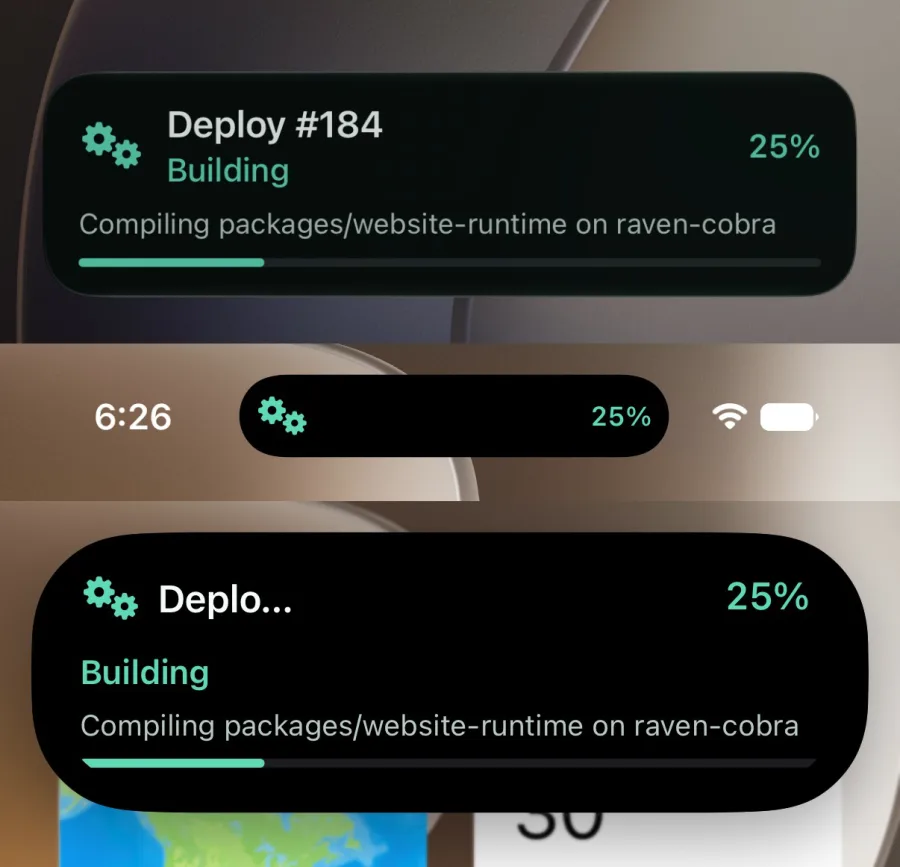
standard — Icon, title over status, trailing percent, linear progress bar. The default.Layout illustration
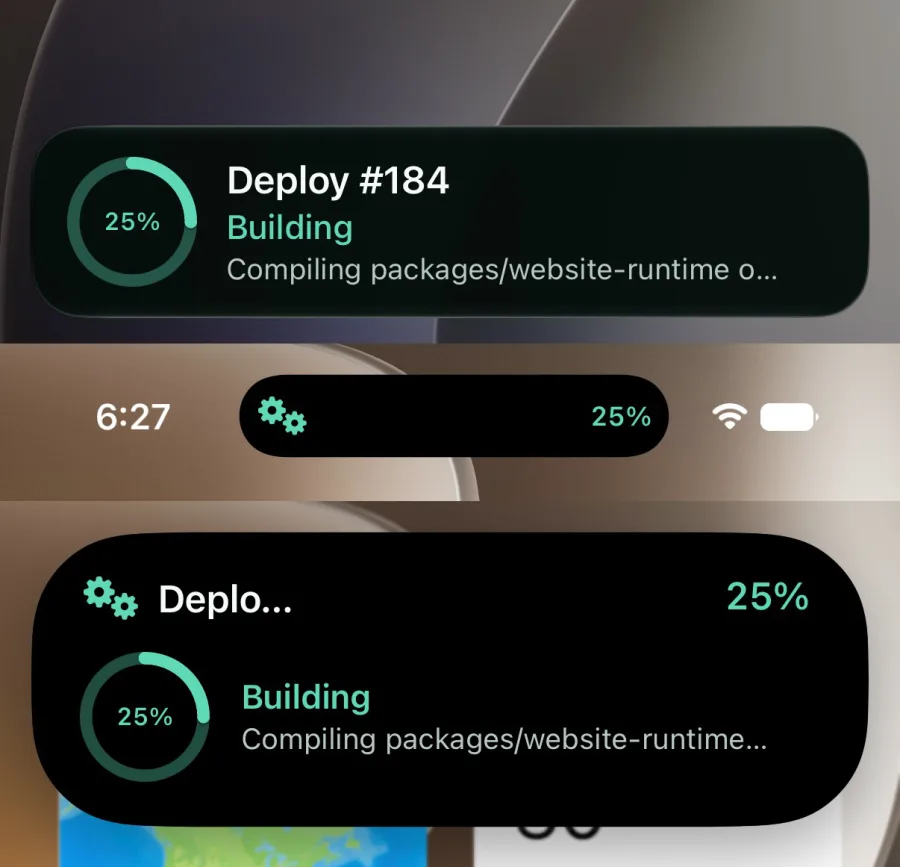
ring — A determinate capacity gauge with the percent centered; no linear bar.Layout illustration
hero — Status becomes the headline and the bar runs edge to edge along the bottom of the card.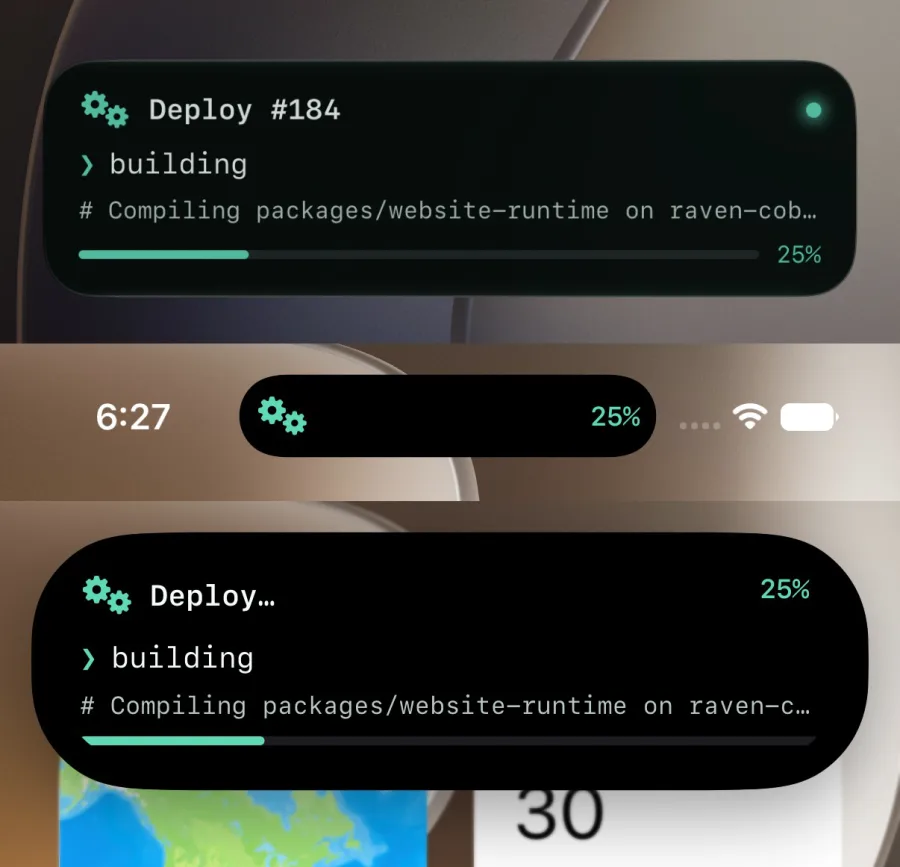
terminal — Monospaced prompt treatment: the status lowercased behind a prompt glyph, the detail as a comment line.Layout illustration
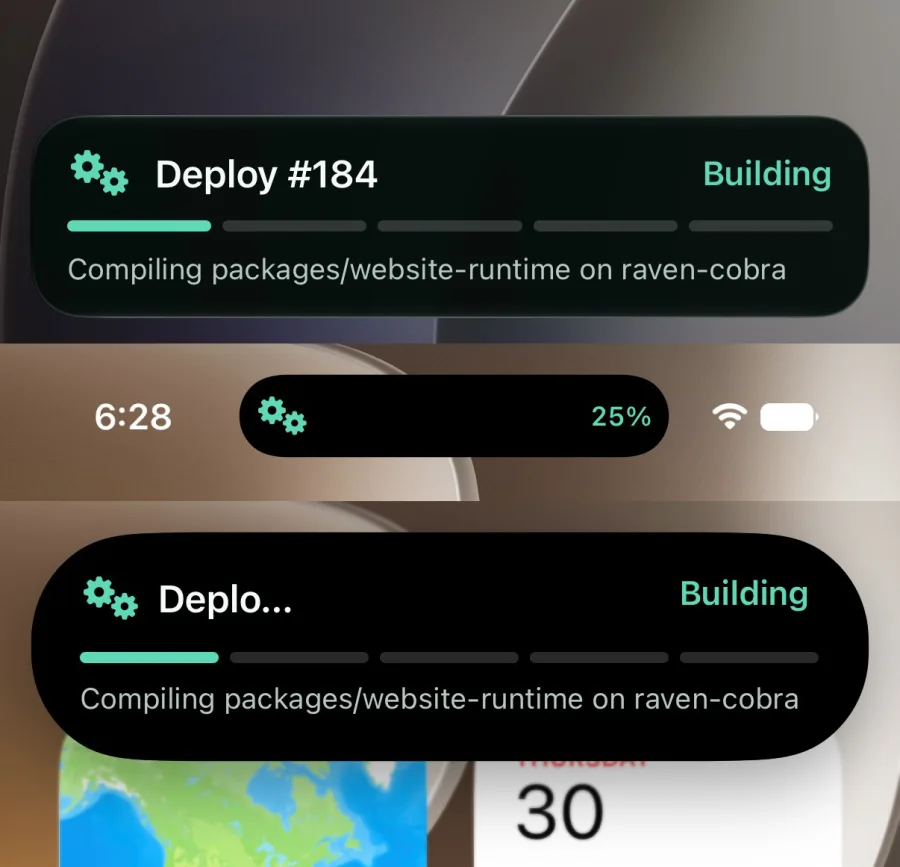
steps — Progress quantized into five stage pips — phases, not percent.Layout illustration
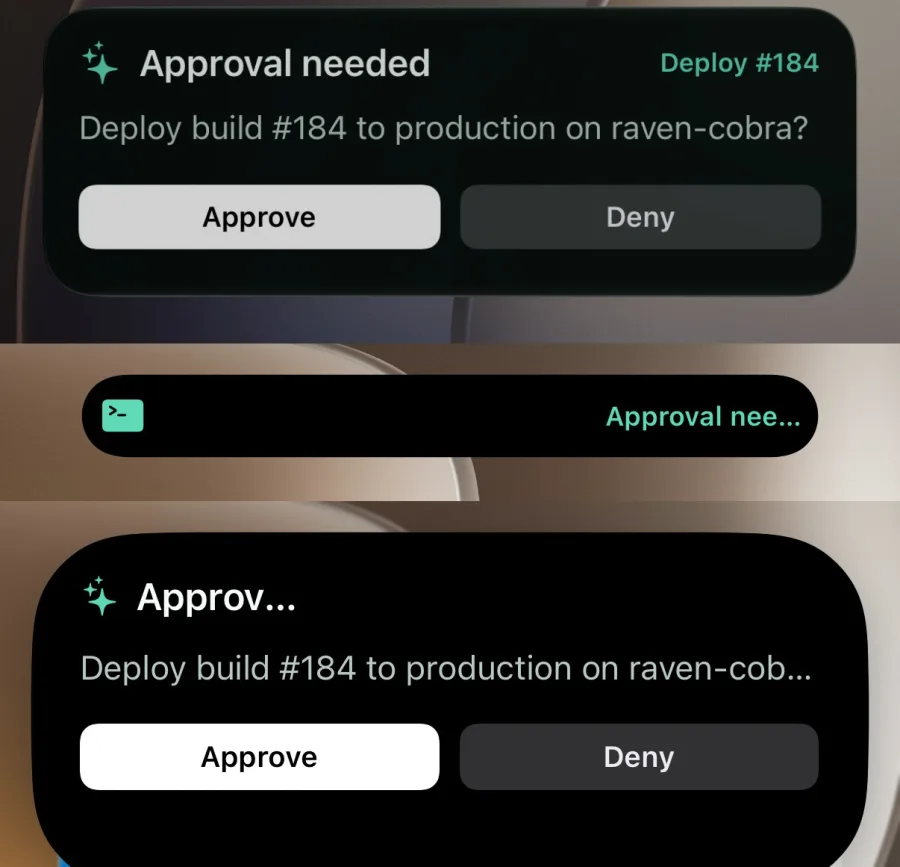
approval — The default interactive layout with a clear prompt and balanced approve/deny actions.Layout illustration
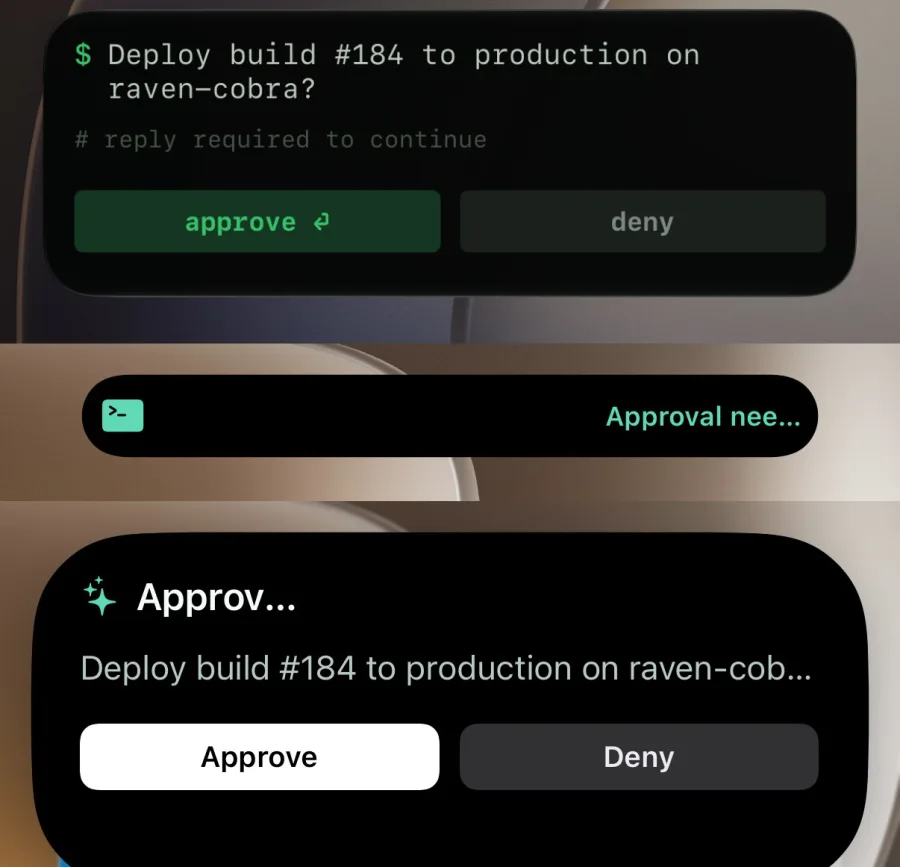
shell — A terminal-native approval prompt with command-line copy and compact green actions.Layout illustration
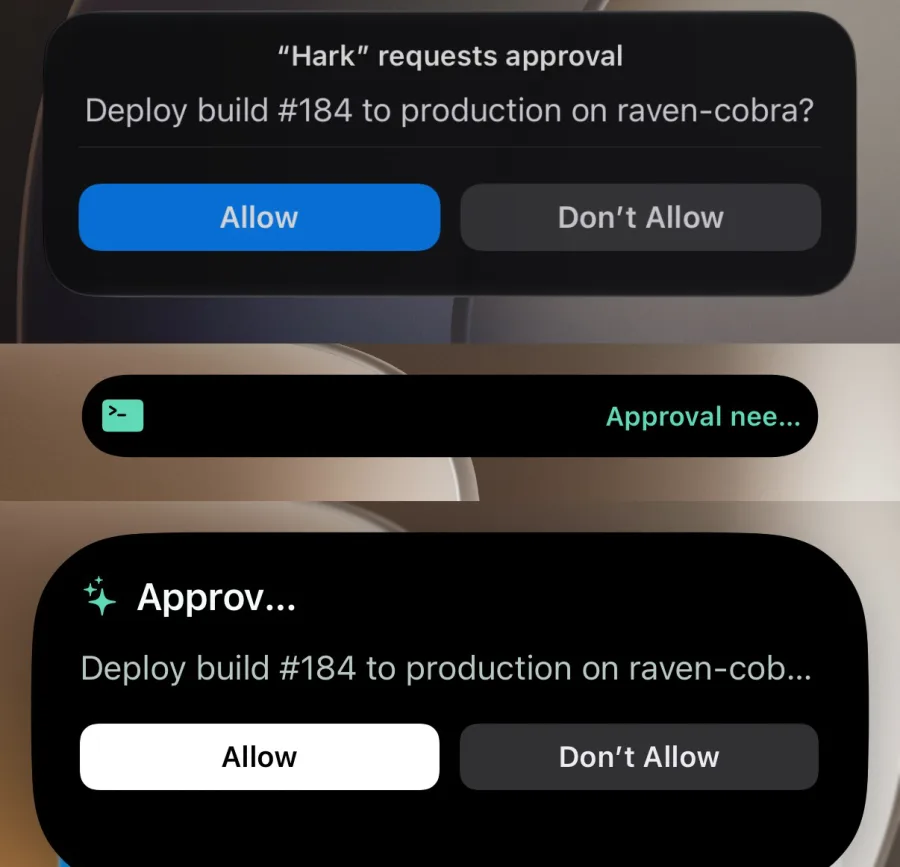
verdict — A centered system-dialog treatment with a divider and high-contrast blue primary action.Layout illustration
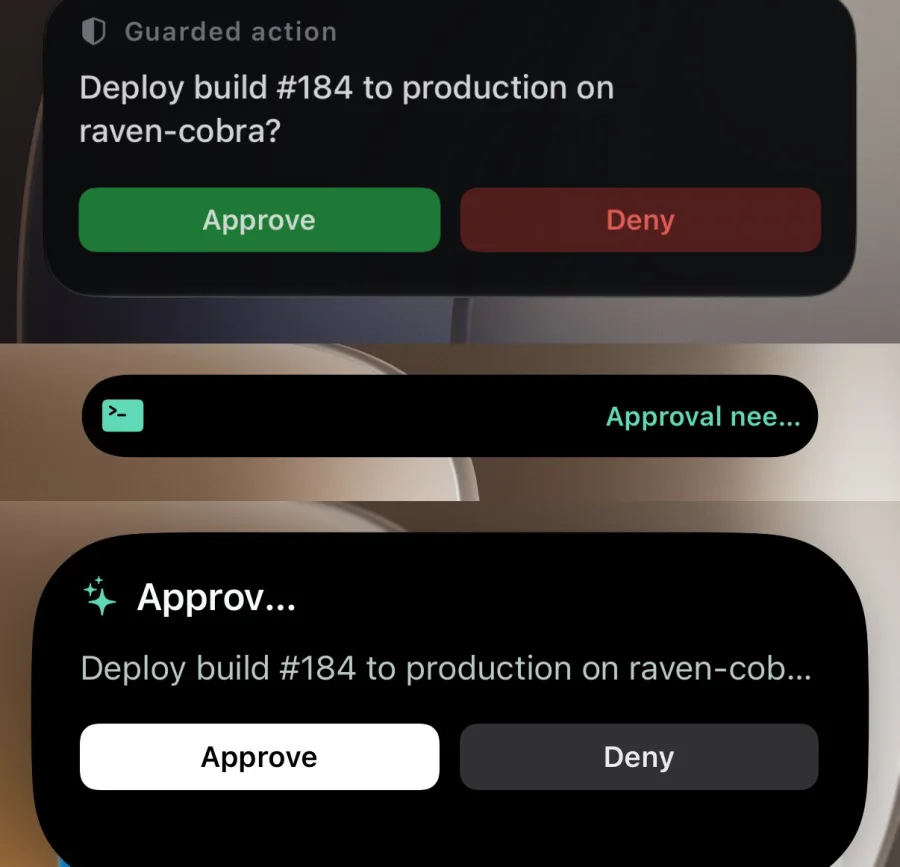
signal — A guarded-action card with restrained security framing and green/red decisions.Layout illustration
Expiry and staleness
expiresInSeconds accepts 60 to 28,800 and defaults to 28,800 — eight hours. Once an activity passes its expiry it is marked expired and stops accepting updates.
staleAfterSeconds accepts 0 to 28,800 and defaults to 14,400 — four hours. Past that deadline iOS treats the content as possibly out of date, but the card stays visible and updateable. Every update rolls the deadline forward from now, clamped to the expiry. An update that omits staleAfterSeconds reuses the previous window.
One per device
A device can host one Hark Live Activity at a time. Starting another while one is still live on a target device returns 409:
{
  "ok": false,
  "error": "A Live Activity is already active on a target device",
  "code": "ACTIVE_ACTIVITY_CONFLICT",
  "activityId": "act_9Rk2wQpLm4Tz"
}
The activityId is included only when the blocking activity belongs to the same service, so you can update it instead of starting over. Branch on code rather than the message text.
To take the slot instead, pass replace: true in the start payload. Hark silently ends whatever occupies each target device — the old card is dismissed immediately, showing its last state — and then starts your activity. The success response reports how many activities were displaced as replaced; with nothing to displace the start behaves normally and replaced is 0.
replace also displaces activities started by your other services or API tokens, so a stale card from another integration cannot deadlock a device, though a foreign activityId is never disclosed. When the start carries a key, your live activity holding that key is ended everywhere — even on devices the start does not target — so the key always transfers to the new run. The implicit ends are not billed against your notification allowance. Combined with reusable keys this makes key plus replace: true a fixed-key restart you can send on every run.
Alerts and priority
A start carries an alert, so it may notify the user like a normal notification. Updates and ends carry no alert and are silent. Hark sends every Live Activity push at high APNs priority, which affects delivery speed only, not sound or haptics.
Live Activity operations count against the same per-minute and monthly limits as notifications, so a chatty progress loop consumes the same budget. Throttle to meaningful state changes.
iOS also budgets push-to-start deliveries per app. Rapid successive starts to the same device can be silently suppressed: the start still reports accepted, but the device never registers an update token, so every later update and end fails with MissingUpdateToken. Space fresh starts out by a minute or so — or keep one activity alive and update it, which is cheaper and never hits the budget.
harkctl CLI
harkctl wraps the agent API for terminals, scripts, and coding agents: one-shot notifications, questions with answers you can wait on, and Live Activities — no webhook URL required. It needs Node.js 22 or newer.
Install and sign in
Run it straight from npm with npx harkctl, or install it globally with npm install -g harkctl. Signing in uses a browser device-authorization flow — no tokens on the command line, ever.
npx harkctl auth login- The CLI prints a short code and opens hark.fyi in your browser.
- Sign in and approve the requested scopes; every scope is shown before you approve.
- Credentials are written to an OS config file with mode
0600, and the CLI polls until the approval lands.
Each login appears under your dashboard's Services list as an agent connection, with its scopes, creation date, and last use. Revoking it there signs that agent out immediately. harkctl auth status shows the active connection; harkctl auth logout revokes and removes local credentials.
Use repeatable --scope flags to narrow access, --client-name to label the connection, and --expires-in (default 90d) to bound its lifetime. For CI or self-hosted setups, HARK_TOKEN and HARK_API_URL environment variables override the config file.
Route agent permissions
Route permission requests from Claude Code, Codex, OpenCode V1, and OpenCode V2 to Hark with one setup command. Only an explicit phone approval grants a request, and it grants it once. Denial, timeout, malformed input, authentication failure, network failure, and no-device delivery deny.
harkctl permissions setup all
harkctl permissions doctor
The default harkctl login includes the required notifications:send, interactions:create, and interactions:read scopes. A narrowed login must retain all three; setup and doctor report missing scopes before hooks are installed.
Use permissions setup claude, permissions setup codex, or permissions setup opencode for one integration. After Codex setup, review and trust the hook through /hooks. OpenCode setup installs both a V1 plugin connector and the V2 background connector on macOS. harkctl permissions uninstall all removes only Hark-owned hooks and services.
Phone prompts contain only the agent name, permission or tool name, project directory basename, and resource count. Raw commands, patches, prompts, file contents, URLs, environment variables, transcript paths, and absolute paths are not sent to Hark.
Create a webhook service
harkctl services create creates a persistent webhook endpoint for another tool or workflow. Its title, image, and tap URL become defaults, so the sender only needs to POST a body. The command prints the credential-bearing webhookUrl in its JSON response.
harkctl services create \
  --title "Release bot" \
  --image https://example.com/bot.png \
  --url https://ci.example.com/releases
{
"service": {
"id": "svc_...",
"title": "Release bot",
"imageUrl": "https://example.com/bot.png"
},
"webhookUrl": "https://hark.fyi/hooks/hook_..."
}Use --stdin to provide the same fields as JSON. services list lists existing services without emitting their webhook credentials. Creation requires services:write; if your CLI login predates that scope, sign in again and approve the updated permissions.
Treat webhookUrl as a secret. Anyone who has it can send notifications through that service.
Send a notification
harkctl notify <body> sends a one-shot push to every active iPhone on your account. Appearance is per call — the title acts as the sender name, and messages with the same title thread together like a service.
harkctl notify "Build 48 passed" \
  --title "CI" \
  --image https://github.com/github.png \
--url https://ci.example.com/builds/48| Flag | Type | Description |
|---|---|---|
| --title | string | Sender name. Defaults to Hark. |
| --image | url | Public HTTPS avatar, same rules as the webhook imageUrl. |
| --url | url | Web URL, app deep link, or Shortcuts URL opened when tapped. |
| --device | id, repeatable | Target specific iPhones. Requires Hark Pro. |
| --project | string | File the notification into a named project in the Hark app inbox. |
| --summary | string | Short push/preview text for a long body. Bodies can hold up to 8,000 characters. |
| --markdown | boolean | Record the body as Markdown (same as --body-format markdown); V1 renders plain text. |
| --app | app id | Open this web app in Hark when tapped; --url must stay on its origin. |
| --idempotency-key | string | Safe retries: replays return the original result without a second push. |
| --stdin | boolean | Merge a JSON object from stdin under the explicit flags. |
Sends from one connection share the webhook per-minute budgets — the requester counts like a service, the account window spans everything — and the same monthly notification allowance.
Ask a question
harkctl notify ask <prompt> sends a push that elicits an answer. Pass exactly one response type: --approval (Approve/Deny), --yes-no (Yes/No), or --text (a short typed reply). The appearance flags from notify all apply.
harkctl notify ask "Deploy 8e7fc2a to production?" \
  --approval --title "Deploybot" --wait --timeout 15m
Add --live-activity to an approval or yes/no request to put its buttons on the Lock Screen and expanded Dynamic Island. --style selects approval, shell, verdict, or signal. --primary-label and --secondary-label customize visible verbs such as Send/Deny or Push/Cancel while the returned action remains canonical. Interactive Live Activity prompts are limited to 240 characters, action labels are 1 to 24 characters, requests require iOS 17+, expire within eight hours, and don't support text replies, images, or URLs.
harkctl notify ask "Send the prepared release email?" \
  --approval --live-activity --style signal \
  --primary-label Send --secondary-label Deny \
  --wait --timeout 15m
--wait blocks until the answer arrives or the timeout passes. --poll waits at most 20 seconds to catch an instant answer, for the case where someone is already looking at their phone. A timed-out poll or wait does not end the prompt — it stays answerable until it expires (default 15 minutes, --expires-in to change), and harkctl interaction wait <id> resumes waiting any time.
{
  "interaction": {
    "id": "int_7MFuml-SqoUmpPLo",
    "kind": "reply",
    "status": "replied",
    "response": "ship it",
    "respondedAt": "2026-07-26T11:54:17.927Z"
  },
  "accepted": 1,
  "timedOut": false
}
Drive a Live Activity
The activity commands drive the Activity API end to end. Address an activity by the returned ID or by your own --key, and pick a layout with --style.
harkctl activity start --key deploy --replace --style ring \
  --title "Deploy #184" --status "Building" --progress 0.1

harkctl activity update deploy --status "Testing" --progress 0.6 --if-sequence 0

harkctl activity end deploy --status "Shipped" --progress 1 --dismiss-after 45s--replacetakes the device slot and the key, ending whatever blocks them, so a fixed-key start works on every run.--if-sequencerejects stale writes: the update only applies if the activity is still at that sequence.--styleselectsstandard,ring,hero,terminal, orsteps, and can change mid-flight onupdate.activity get <id|key>reads current state;activity listshows recent activities.
Scripting and exit codes
Every successful command prints exactly one JSON object to stdout (apps commands print readable lines unless you pass --json); diagnostics go to stderr. Exit codes make answers branchable without parsing:
0— success, approved, yes, or replied4— timed out, canceled, or expired5— denied or no7— no device accepted the push1API error ·2usage error ·3authentication or scope error ·6network error
if harkctl notify ask "Deploy to production?" --approval --wait --timeout 10m; then
  ./deploy.sh && harkctl notify "Deployed" --title "Deploybot"
else
  echo "Not approved" >&2
fi
Web apps
Open any HTTPS site you control full-screen in the Hark iPhone app. Hark hands the page a short-lived signed Hark pass, so your site can identify the viewer without building its own login.
Register an app
Register an app with harkctl apps create. Registering the same URL again updates its name, icon, or project. Apps appear in the Hark iPhone app, which asks you to approve sign-in the first time one opens; you can revoke that approval or choose whether your name and email are shared at any time.
harkctl apps create --name "Ops dashboard"   --url https://ops.example.com --icon https://ops.example.com/icon.png

harkctl apps list
harkctl apps remove app_...
Launch URLs must use HTTPS; plain HTTP is accepted only for localhost development servers. Accounts hold up to 100 apps. Agent tokens need the apps:read and apps:write scopes; sign in again if your login predates them.
Verify the Hark pass
- Inside the Hark app, your page calls
await window.hark.getToken(), which resolves to a pass string.window.harkexists only in Hark;window.hark.close()returns to the app. - The page sends the pass to your server, which verifies it as an ES256 JWT against the Hark JWKS — for example with
jwtVerifyfromjose. - Require issuer
https://hark.ryan.ceo(passes keep this issuer after the move to hark.fyi), audience equal to your app's origin,typhark-pass+jwt, and algorithmES256, then start your own session.
| Field | Type | Description |
|---|---|---|
| sub | string | Stable user ID for your origin (hk_…). It differs for every other origin, so apps cannot correlate users. |
| aud | string | Your app's origin, e.g. https://app.example.com. |
| iat / exp | number | Passes expire two minutes after issue. |
| jti | string | Unique per pass; reject reused values to block replay. |
| app_id | string | The Hark app ID the pass was issued for. |
| name / email | string | Present only when the owner shares them. Name is shared by default; email is not. |
| team_id / team_role | string | Present for team apps: the viewer's team and their current role (owner, admin, or member). |
Never trust a pass you have not verified, and never treat it as a long-lived credential: verify once, then rely on your own session.
Open from a notification
Pass appId on a webhook (or --app to harkctl notify) to open the app when the notification is tapped. Add url to deep-link within it; it must share the app's origin.
{
  "body": "Nightly report is ready",
  "appId": "app_...",
  "url": "https://ops.example.com/reports/latest"
}
Teams
A team shares web apps and on-call groups between Hark accounts. Everyone keeps their own phone, inbox, and sign-in decisions; the team only decides what is shared.
Teams and roles
Create a team in the dashboard or with harkctl teams create. You become its owner. Each member has one role:
| Field | Type | Description |
|---|---|---|
| owner | one per team | Everything an admin can do, plus deleting the team, managing billing, and transferring ownership. The owner must transfer ownership before leaving. |
| admin | role | Renames the team, invites and removes members, changes roles, removes any team app, and creates and edits on-call groups. |
| member | role | Uses and adds team apps, raises and acknowledges pages, and schedules overrides for themselves. |
Transferring ownership (setting someone's role to owner) makes the previous owner an admin. Removing a member takes effect immediately: they stop receiving Hark passes for the team's apps and leave every rotation.
Seats and pricing
Every member uses a seat. The first seat is free, so a team of one costs nothing. Each additional member needs the team plan at $5 per seat per month, billed to the team (not to anyone's personal plan) and prorated as people join and leave.
Without the team plan, creating or accepting an invite for a second member returns 402 with code seat_limit. The team owner starts checkout or opens the billing portal from the team page in the dashboard.
Pages count against the notification allowance of whoever raised them (the agent's or service's owner), like any other notification. Team notices such as invites and shared apps are free.
Invite people
Owners and admins create invite links. Each link joins one person, expires after seven days, and can be revoked. Add an email to also push the invite to an existing Hark user with that address.
harkctl teams invite team_... --email [email protected] --role member
# { "invite": { ... }, "code": "…", "url": "https://hark.fyi/join/…" }
Opening the link shows the team, who invited you, and the role. Joining requires signing in: agents can create invites but never accept them.
Team apps
Any member can add a web app to a team, or move one of their own apps into it with harkctl apps share app_... --team team_... (--personal moves it back). The other members are notified and see the app next to their own.
- Every member approves sign-in and chooses whether their name and email are shared for themselves; nobody approves on someone else's behalf.
- Passes for team apps carry the usual pairwise
subplusteam_idandteam_role, checked at issue time, so your site can authorize by team. - The person who added an app, and team admins, can rename or remove it. Deleting a team returns its apps to the people who added them.
On-call
On-call groups page whoever is on call right now, then escalate until someone takes it. Pages arrive with an alarm sound and Acknowledge and Escalate actions on the Lock Screen, and keep ringing until someone acknowledges.
Groups and rotations
Team owners and admins create on-call groups. A rotation is an ordered list of team members who hand off daily or weekly at a local time in an IANA time zone. Handoffs follow the local clock across daylight-saving changes, so a 09:00 handoff stays at 09:00.
harkctl oncall create --team team_... --name Primary \
  --members user_a,user_b,user_c --period weekly \
  --handoff 09:00 --timezone America/New_York
Without startsAt, the first member is on call from the latest handoff. Overrides put someone on call for a window (covering a shift, a holiday) and replace the rotation while they last; any member can schedule one for themselves. Each group lists its current shift and the next few.
Paging and escalation
A page goes first to the person on call. If nobody is on call, the whole group is paged. The group's escalation policy then pages more people, level by level, until someone acknowledges.
The default policy pages the next person in the rotation after 5 minutes, then the whole group 10 minutes later. Pages with the same dedupKey merge into the open page (its repeatCount grows) instead of paging again.
Each page has an urgency. high (the default) rings until someone acknowledges and follows the escalation policy. low sends one ordinary alert (default sound, never critical) to whoever is on call, with no repeats and no escalation; if a person escalates it, it becomes high and rings from there. Use low for things that can wait until morning.
harkctl page ocg_... "API error rate above 20%" \
  --body "5xx since 14:02" --dedup-key api-5xx

# Can wait until morning: one quiet alert, no ringing or escalation
harkctl page ocg_... "Cert expires in 20 days" --urgency low
Escalation policies
An escalation policy is a list of levels. Level 0 is always whoever is on call (or the whole group when nobody is). Each entry in escalation adds the next level, up to 5, and says how long the level before it has to acknowledge:
| Field | Type | Description |
|---|---|---|
| afterMinutes | integer | The previous level's acknowledgement timeout, 1 to 1440: how long it rings before this level starts. |
| target | next | oncall | people | group | team | next: the next person in the rotation. oncall: whoever is on call in this group, or in groupId. people: everyone in userIds at once. group: every member of the group. team: every member of the team. |
| userIds | string[] | Required for people: 1 to 20 team members. |
| groupId | string | Optional for oncall: another on-call group in the same team. |
| Field | Type | Description |
|---|---|---|
| escalationMode | fan_out | hand_off | fan_out (default): earlier levels keep ringing as new ones join. hand_off: a new level silences the levels before it. |
| escalationLoops | integer | Run the policy again from level 0 this many times, 0 to 3 (default 0). The last level waits as long as the first before a loop starts. |
| escalationFinal | none | group | team | Paged once after the last level and any loops (default none), again after the first level's timeout. |
Ringing at every level follows the group's ring-until-acknowledged settings. Levels can only name members and groups of the same team. This policy pages whoever is on call, then Ben and Cal 5 minutes later, then whoever is on call in the Ops group, runs once more, and finally pages the whole team:
{
  "escalation": [
    { "afterMinutes": 5, "target": "people", "userIds": ["user_ben", "user_cal"] },
    { "afterMinutes": 10, "target": "oncall", "groupId": "ocg_ops" }
  ],
  "escalationMode": "fan_out",
  "escalationLoops": 1,
  "escalationFinal": "team"
}
harkctl oncall update ocg_... \
--escalation 5:people=user_ben+user_cal,10:oncall=ocg_ops \
--escalation-mode fan_out --escalation-loops 1 --escalation-final teamSend these fields to POST /api/agent/teams/:id/oncall or PATCH /api/agent/oncall/:groupId, or edit the policy on the team page in the dashboard. A group's summary reads like On call → 5 min → Ben, Cal → 10 min → on call in Ops; fan out; loops 1×; then the whole team after 5 min.
Each page carries a timeline: who was paged at which level and loop, who escalated by hand (escalatedBy), and who acknowledged and resolved it. The dashboard shows it under each page, and harkctl pages get page_... --timeline prints it.
Ring until acknowledged
A page keeps ringing until someone acknowledges it. Whoever is being paged gets the alert again on the group's interval, up to its repeat limit. Each escalation level rings the people it pages; with fan_out earlier levels keep ringing too, with hand_off they stop. Acknowledging or resolving the page stops all ringing at once.
| Field | Type | Description |
|---|---|---|
| ringIntervalSeconds | integer | Seconds between repeat alerts, 30 to 300. Default 60. |
| ringMaxRepeats | integer | Repeat alerts per person after the first, 0 to 30. Default 10; 0 alerts once. |
harkctl oncall update ocg_... --ring-interval 120 --ring-repeats 5Every page uses Hark's alarm sound and one notification per page: a repeat replaces the alert on the phone instead of stacking, and still plays the sound. Repeats are not billed as extra notifications. A page's ringing list shows who is still being re-alerted, with ringCount and nextRingAt.
Each person sets their own paging preferences, which apply in every group: ringUntilAcknowledged (default on; off alerts once per page) and ringIntervalSeconds (a personal interval, or null for each group's). Change them on the team page in the dashboard, in the app, or with GET and PATCH /api/oncall/settings. Agents use /api/agent/oncall/settings (oncall:read / oncall:write), harkctl oncall settings, or the oncall_settings_get and oncall_settings_update tools. /api/oncall/me includes the same settings.
harkctl oncall settings
harkctl oncall settings set --ring-until-ack on --ring-interval group| Field | Type | Description |
|---|---|---|
| authorized | state | Pages arrive as critical alerts that ring through the silent switch and Focus. |
| denied | state | Critical Alerts are off in Settings. Pages are time-sensitive with the alarm sound. |
| notDetermined | state | The app has not asked yet. Pages are time-sensitive with the alarm sound. |
| unavailable | state | This build of the app does not have Critical Alerts yet. Pages are time-sensitive with the alarm sound. |
Critical Alerts need an Apple entitlement that is still pending, so for now pages are time-sensitive: they break through Focus but not the silent switch. Keep the ringer on while you are on call.
Page from a webhook
Add oncall to a webhook payload to page a group instead of notifying your own devices. The service owner must belong to the group's team, and oncall cannot be combined with deviceIds or response. The Idempotency-Key header becomes the page's dedup key, so retries merge into the open page.
{
  "title": "Checkout API",
  "body": "Error rate above 20% for 5 minutes",
  "oncall": "ocg_...",
  "urgency": "high"
}
urgency is optional (high or low, default high) and only valid with oncall. The response carries pageId and delivered. Page bodies are limited to 2,000 characters. Agents page with harkctl page or harkctl notify --oncall.
Acknowledge and resolve
Anyone on the team can acknowledge a page from the Lock Screen, the app, or the website. Acknowledging claims the page, and the first acknowledgement wins: escalation stops, everyone else's ringing stops, their alert is replaced by a quiet "Claimed by" notice with the claimer's name, and later acknowledgements are refused. Escalate jumps to the next level right away and records who escalated; past the last level it pages the whole group (or the team when that is the final step).
Acknowledging and escalating are human-only. An acknowledgement tells the team a person is on it, so agents can raise, read, and resolve pages but have no route to acknowledge or escalate them.
Resolve a page when the incident is over, from the website or with harkctl pages resolve page_... --note "Rolled back". Resolving an unacknowledged page also stops its escalation.
Agent API
Everything you can do in the dashboard or the phone inbox is also available to a scoped agent token, except the few decisions only you should make. harkctl wraps every route.
Tokens and scopes
Send Authorization: Bearer hark_… with a token from harkctl auth login or the dashboard's Agent connections. Each route requires the scopes listed below; a missing scope returns 403 with required naming them. Every resource is scoped to the token's account, and other accounts' IDs return 404.
- Default
harkctllogins request every scope exceptevents:readandtokens:manage; add those with--scope. devices:write,inbox:read,inbox:write,billing:read, andtokens:managewere added with this API, andteams:read,teams:write,oncall:read, andoncall:writewith teams; older logins must sign in again to use them.- Agent reads of services never include webhook URLs. Only create and rotate return a URL, once.
Routes
| Route | Purpose |
|---|---|
| GET /api/agent/auth/status | Describe the calling token. Any scope. |
| POST /api/agent/auth/revoke | Revoke the calling token. Any scope. |
| POST /api/agent/notifications | Send a push. notifications:send. |
| POST /api/agent/notifications/:id/withdraw | Remove a sent agent push from Notification Center and mark it read. notifications:send. |
| GET /api/agent/interactions | Pending prompts from every source on the account. interactions:read. |
| POST /api/agent/interactions | Ask a question. interactions:create and notifications:send. |
| GET /api/agent/interactions/:id | Read a prompt this token created; /wait long-polls it. interactions:read. |
| POST /api/agent/interactions/:id/cancel | Cancel a prompt this token created. interactions:create. |
| GET /api/agent/inbox/projects | Inbox projects with unread counts. inbox:read. |
| GET /api/agent/inbox/notifications | Inbox page: limit, project, unread, cursor. inbox:read. |
| GET /api/agent/inbox/notifications/:id | One notification with its full body. inbox:read. |
| POST /api/agent/inbox/notifications/:id/read | Mark read; /unread reverses it. inbox:write. |
| POST /api/agent/inbox/notifications/read-all | Mark read up to a list response's readThroughToken. inbox:write. |
| GET /api/agent/activity-feed | Account activity history: filter, page. events:read. |
| GET /api/agent/events | Recent webhook deliveries. events:read. |
| GET /api/agent/services | List services, or /:id for one, without webhook URLs. services:read. |
| POST /api/agent/services | Create a service; the webhook URL is returned once. services:write. |
| PATCH /api/agent/services/:id | Change title, avatar, or tap URL; DELETE removes it. services:write. |
| POST /api/agent/services/:id/rotate | Replace the webhook token; the new URL is returned once. services:write. |
| GET /api/agent/devices | Registered devices. devices:read. |
| DELETE /api/agent/devices/:id | Remove a device until Hark next opens on it. devices:write. |
| GET /api/agent/apps | List apps, or /:id for one. apps:read. |
| POST /api/agent/apps | Register an app; an existing URL is updated. apps:write. |
| PATCH /api/agent/apps/:id | Change name, URL, icon, or project; DELETE removes it. apps:write. |
| POST /api/agent/apps/:id/revoke | Sign the app out until the owner approves it again. apps:write. |
| POST /api/agent/apps/:id/share | Move an app you added into a team, or back. apps:write. |
| GET /api/agent/teams | Your teams, or /:id for one with its members. teams:read; POST, PATCH, and DELETE need teams:write. |
| POST /api/agent/teams/:id/invites | Create a join link; GET lists them. teams:write / teams:read. |
| PATCH /api/agent/teams/:id/members/:userId | Change a role; DELETE removes the member. teams:write. |
| GET /api/agent/teams/:id/oncall | The team's on-call groups; POST creates one. oncall:read / oncall:write. |
| PATCH /api/agent/oncall/:groupId | Edit a group, its /overrides, or raise /pages. oncall:write. |
| GET /api/agent/oncall/settings | Your paging preferences and each iPhone's Critical Alerts status; PATCH changes them. oncall:read / oncall:write. |
| GET /api/agent/teams/:id/pages | The team's pages: status, cursor, limit. oncall:read. |
| POST /api/agent/pages/:id/resolve | Resolve a page; GET /api/agent/pages/:id reads one. oncall:write. |
| GET /api/agent/activities | Live Activities this token started; full CRUD under /:identifier. activities:read / activities:write. |
| GET /api/agent/billing | Plan, limits, and remaining usage. billing:read. |
| GET /api/agent/tokens | The account's tokens, never their secrets. tokens:manage. |
| DELETE /api/agent/tokens/:id | Revoke another token of the account. tokens:manage. |
harkctl inbox list --unread --limit 20
harkctl inbox read-all --project unfiled
harkctl interaction list
harkctl notify withdraw anot_...
harkctl services rotate svc_...
harkctl apps update app_... --name "Ops board"
harkctl billing
harkctl tokens list   # needs --scope tokens:manage at login
Human-only actions
Some actions have no agent route on purpose. An agent may reduce access, but only a person on their phone or signed in to the dashboard can grant it.
- Answering prompts: an approval means a human approved, so agents can list and cancel prompts but never respond to them.
- Creating API tokens: a token that could mint tokens could grant itself any scope and outlive its own revocation. Agents can list and revoke tokens with
tokens:manage. - App sign-in: approving sign-in, issuing Hark passes, and choosing whether your name and email are shared stay on the phone. Moving an app's URL to a new origin clears its approval.
- Registering devices, which needs the iPhone's push token.
- Starting checkout or opening the billing portal, for you or a team.
- Accepting a team invite: joining a team is your decision.
- Acknowledging or escalating a page: an acknowledgement tells the team a person is on it.
OpenAPI document
A public OpenAPI 3.1 document describes every agent route, its scopes (x-hark-scopes), request schema, and response shape. Request schemas are generated from the same validators the server uses.
https://hark.fyi/api/agent/openapi.jsonMCP server
Hark is also a remote MCP server, so Claude, OpenCode, Cursor, and other MCP clients can use every agent API operation as a tool. It signs in with OAuth: there is no token to paste.
Connect a client
Add the server URL to your MCP client. It uses the Streamable HTTP transport.
https://hark.fyi/mcpOpenCode reads remote servers from opencode.json:
{
  "$schema": "https://opencode.ai/config.json",
  "mcp": {
    "hark": { "type": "remote", "url": "https://hark.fyi/mcp" }
  }
}
Claude Code adds it from the terminal, and Cursor reads ~/.cursor/mcp.json:
claude mcp add --transport http hark https://hark.fyi/mcp{
"mcpServers": {
"hark": { "url": "https://hark.fyi/mcp" }
}
}Sign-in and permissions
- Your client calls the server, gets
401with aresource_metadatapointer, and registers itself with Hark (dynamic client registration). - Your browser opens Hark's consent page. Sign in with Apple or Google if needed.
- Review what the client asks for, untick anything you do not want, and approve. Hark remembers your answer for that client and set of permissions.
- The client receives a one-hour access token for
/mcp, plus a refresh token if you left Stay connected ticked.
OAuth scopes are the agent API scopes one to one, plus offline_access for Stay connected. A client that asks for no scope requests everything except tokens:manage. PKCE (S256) is required, and tokens are only valid for the /mcp resource.
Connected clients are listed on the dashboard; Disconnect revokes their access and refresh tokens at once. With tokens:manage, agents see them as kind: "oauth" entries from GET /api/agent/tokens and can revoke them too.
| Route | Purpose |
|---|---|
| GET /.well-known/oauth-protected-resource/mcp | Protected resource metadata (RFC 9728) for the MCP server. |
| GET /.well-known/oauth-authorization-server | Authorization server metadata (RFC 8414): authorize, token, and registration endpoints. |
Tools
There is one tool per agent API route, and each runs through that route's handler, so validation, scopes, and limits are identical. A tool the connection was not granted a scope for returns an error naming the missing scope.
notifysends a push;notification_withdrawremoves it.asksends an approval, yes/no, or reply prompt and waits up to ten minutes for your answer, sending progress updates while it waits.interactions_create,interactions_wait,interactions_get,interactions_list, andinteractions_cancelsplit that up.activities_start,activities_update,activities_end,activities_get, andactivities_listdrive Live Activities.services_*,devices_*,events_list,activity_feed,inbox_*,apps_*,billing_get, andtokens_*manage the account.teams_*,oncall_*, andpages_*manage teams, rotations, and pages.auth_statusshows the connection's scopes;auth_revokedisconnects the client.
The human-only actions above are never tools: answering prompts, acknowledging or escalating pages, accepting invites, approving app sign-in, changing sharing or issuing passes, creating tokens, and billing checkout. Webhook URLs and join links in tool results are shown once and flagged as secrets.